

Plates
To define a new plate, a technical drawing is essential. A standard plate class is defined based on the ANSI/SLAS Microplate Standards. A typical technical drawing from a vendor has the following information:
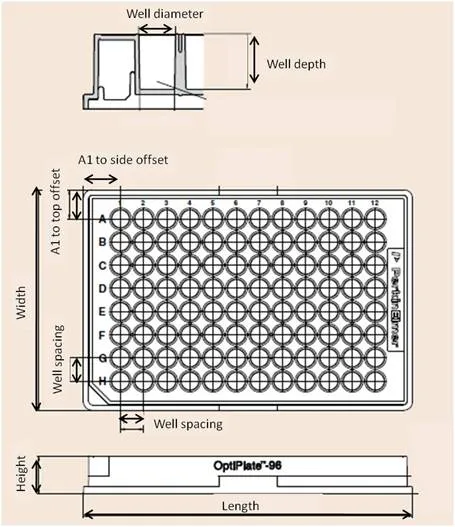
We need the length, width, and height which are the base dimensions (x, y, z) of the plate respectively. Furthermore, we need the offsets in x-, y-, and z-direction starting from well A1. To define the wells, it may be necessary to measure the well width, length, and depth. The plate in this example follows the standard definition of a 96 well plate and has the following dimensions:
- Cols, rows: 12, 8
- Length, width, height (mm): 127.76 mm, 85.48 mm, 14.35 mm
By using the place_standardized(count=96) method, the offsets and spacing are inferred from the standard specification. If the plate deviates from the specification, the place() method can be used to define custom offsets, well spacings, or alignments.
In the code below, we create a 96-well plate with a cylindrical form and a round bottom.
import collections.abc
import dataclasses

from unitelabs.labware import (
    Container,
    Cylinder,
    Decimal,
    Plate,
    StandardMicroplateDimensions,
    Well,
    place_standardized,
)


@dataclasses.dataclass
class Standard96Plate(Plate, StandardMicroplateDimensions):
    """Standard 96-well plate."""

    cols: int = 12
    rows: int = 8
    grab_height: Decimal = dataclasses.field(default=Decimal(default=13.2))
    children: collections.abc.Sequence[Well] = dataclasses.field(
        repr=False,
        default_factory=lambda: [
            Well(
                container=Container(max_volume=300, sections=[Cylinder(radius=3.48, height=10.67)]),
                dimensions=dimension,
            ).copy(location=location)
            for location, dimension in place_standardized(count=96)
        ],
    )
Ad-hoc building in your workflow
You can find the plate that is defined below in the Thermofisher webshop under the model number 3959. Corning has published a table of the dimensions for all their plates here. They have a separate table for cell-culture plates.
In this example, we will define the plate "on the fly" and not as a dataclass. The total height of the plate is 23.24 mm. The well bottom is offset from the ground by 0.74 mm and the boundary box at which the well ends is 2.5 mm below the height of the plate. The spacing between the wells is 9.025 mm and thus deviates from the standard specification by 0.025 mm. The volume of the well is calculated with the approximation of a conical frustum. To yield more accurate results, the well could be divided into two sections: a conical frustum and a spherical segment at the bottom. However, the required measurements are not provided by the technical data sheet. A maximum volume is defined for this well. The maximum volume corresponds to the recommended working volume.
from unitelabs.labware import (
    ConicalFrustum,
    Container,
    Plate,
    Vector,
    Well,
    place,
)

# MicroAmp_Optical_96_Well_Reaction_Plate approximated with a conical frustum shape
microamp_optical_96_well = Plate(
    dimensions=Vector(x=125.98, y=85.85, z=23.24),  # base dimension in mm
    children=[
        Well(
            container=Container(
                max_volume=200,
                sections=[
                    ConicalFrustum(
                        radius_lower=1,
                        radius_upper=2.747,
                        height=23.24 - 0.74 - 2.5,
                    )
                ],
            ),
            dimensions=dimensions,
        ).copy(location=location)
        for location, dimensions in place(
            rows=8,
            cols=12,
            boundary=Vector(x=125.98, y=85.85, z=23.24 - 2.5),
            item=Vector(x=9.025, y=9.025, z=23.24 - 0.74 - 2.5),
        )
    ],
)
The plate and well object properties can be accessed to double-check their definition:
print(f'Absolute location of the plate: {microamp_optical_96_well.absolute_location}')

print(f'Base dimensions of the plate: {microamp_optical_96_well.dimensions}')

print(f'The relative location of well A1: {microamp_optical_96_well[0].location}')

print(f'The absolute location of well A1: {microamp_optical_96_well[0].absolute_location}')

print(f'The height of well A1: {microamp_optical_96_well[0].height}')
Since the plate is not assigned to a deck, its absolute location is the origin. The well is a part of the plate and therefore its absolute location is relative to the location of the plate. As shown in the well z-location, the well bottom sits 0.74 mm above the plate bottom, accounting for the material of the well bottom/plate base.
Absolute location of the plate: Vector(x=Decimal('0'), y=Decimal('0'), z=Decimal('0'))
Base dimensions of the pate: Vector(x=Decimal('125.98'), y=Decimal('85.85'), z=Decimal('23.24'))
The relative location of well A1: Vector(x=Decimal('8.840'), y=Decimal('70.000'), z=Decimal('0.74'))
The absolute location of well A1: Vector(x=Decimal('8.840'), y=Decimal('70.000'), z=Decimal('0.74'))
The height of well A1: 20.0
The wells on the plate have containers. These containers are defined by their shape by which volume and liquid level calculations are performed. While these are used heavily in the background, they can also be directly accessed. Here are some useful properties and methods of the general container object:
from unitelabs.labware import PredefinedLiquids

microamp_optical_96_well[0].container.add_liquid(liquid=PredefinedLiquids.WATER, volume=50)

print(f'The max volume defined by the creator: {microamp_optical_96_well[0].container.max_volume} µL')

print(f'The max calculated volume derived from the dimensions: {round(microamp_optical_96_well[0].container.max_fitting_volume, 3)} µL')

print(f'The current volume inside of this container: {round(microamp_optical_96_well[0].container.volume, 3)} µL')

print(f'The current liquid level inside of the container: {round(microamp_optical_96_well[0].container.liquid_level, 3)} mm')

print(f'Calculating the volume inside the container for a height of 10 mm: {round(microamp_optical_96_well[0].container.volume_for_height(height=10), 3)} µL')

print(f'Calculating the liquid level height for volume of 100 µL: {round(microamp_optical_96_well[0].container.height_for_volume(volume=100), 3)} mm')
To pre-fill every well at construction, pass filled_with to the plate — this works for both predefined plates and the ad-hoc Plate(...) shown above:
microamp_optical_96_well = Plate(
    dimensions=Vector(x=125.98, y=85.85, z=23.24),
    children=[...],  # as above
    filled_with=(PredefinedLiquids.WATER, 50),
)
See Pre-filling Labware for mixtures, troughs, and the full behavior.
These functions can be used to verify the labware definition.
The max volume defined by the creator: 200 µL
The max calculated volume derived from the dimensions: 236.520 µL
The current volume inside of this container: 50.000 µL
The current liquid level inside of the container: 8.348 mm
Calculating the volume inside the container for a height of 10 mm: 66.848 µL
Calculating the liquid level height for volume of 100 µL: 12.662 mm
Shape Dimensions at Height
Labware containers can be made up of different shape types such as Cylinder, Cuboid, Cone, Pyramid, and others. When an operation needs to know the width of a container at a specific height — for example, to move a pipetting channel to the side of a well — there is no single shared property for this across all shapes. Without a universal interface, logic that depends on the cross-sectional width or area at a given height must handle each shape type separately, which is error-prone and hard to maintain.
To solve this, three methods are available on all concrete shape classes:
width_at_height(height)— Returns the x-axis extent of the cross-section at a given height.depth_at_height(height)— Returns the y-axis extent of the cross-section at a given height. For circular shapes this equals the width.area_at_height(height)— Returns the cross-sectional area at a given height.
For stacked containers (any Container with multiple sections), an additional method is available:
section_at_height(height)— Returns atuple[Shape, Decimal]containing the shape section and the local height within that section.Containerautomatically delegateswidth_at_height,depth_at_height, andarea_at_heightthrough this method.
Usage Example
Given the Standard50mLTube defined in Tubes and Tube Racks — a tube with a cylindrical upper section and a conical frustum at the bottom — you can query the width at any height without caring which section you are in:
from unitelabs.labware import Decimal

tube = Standard50mLTube()

# Width at the middle of the cylindrical section (e.g. 50 mm from bottom)
width_mid = tube.container.width_at_height(Decimal("50"))
print(f"Width at 50 mm: {width_mid} mm")  # 27.78 mm (2 × 13.89)

# Width near the tip of the conical frustum (e.g. 5 mm from bottom)
width_tip = tube.container.width_at_height(Decimal("5"))
print(f"Width at 5 mm: {width_tip} mm")  # interpolated between 7.2 mm and 27.78 mm

# Cross-sectional area at 50 mm
area = tube.container.area_at_height(Decimal("50"))
print(f"Area at 50 mm: {round(area, 3)} mm²")  # π × 13.89²

# Inspect which section and local offset a given height falls into
section, local_height = tube.container.section_at_height(Decimal("5"))
print(f"Section: {section}")          # ConicalFrustum(...)
print(f"Local height: {local_height} mm")
Shape Reference
The table below shows how each concrete shape implements the three methods, where h is the queried height and H is the total height of the shape:
| Shape | width_at_height(h) | depth_at_height(h) | area_at_height(h) |
|---|---|---|---|
| Cuboid | width (constant) | depth (constant) | width × depth |
| Pyramid | (h/H) × width | (h/H) × depth | (h/H)² × width × depth |
| PyramidalFrustum | linear interpolation between width_lower and width_upper | linear interpolation between depth_lower and depth_upper | w(h) × d(h) |
| Cylinder | 2 × radius (constant) | 2 × radius (constant) | π × r² |
| Cone | 2 × (h/H) × radius | same as width | π × ((h/H) × r)² |
| ConicalFrustum | 2 × r(h), linear interpolation between radius_lower and radius_upper | same as width | π × r(h)² |
| SphericalCap | 2 × √(2Rh − h²) | same as width | π × (2Rh − h²) |
| HalfSphere | inherits from SphericalCap | inherits from SphericalCap | inherits from SphericalCap |
| SphericalSegment | 2 × √(2R·h' − h'²) where h' is height from sphere bottom | same as width | π × (2R·h' − h'²) |
Container has multiple sections, width_at_height, depth_at_height, and area_at_height automatically resolve the correct section via section_at_height. The height passed is always measured from the bottom of the container, not from the bottom of the individual section.Standard Dimensions
As mentioned in the plate section, most microplates follow the ANSI/SLAS Microplate Standards. To facilitate the creation and usage of labware, the library stores standard dimensions in two classes:
from unitelabs.labware.dimensions import StandardMicroplateDimensions
StandardMicroplateDimensions
StandardMicroplateDimensions holds the standard footprint (x and y dimensions) of microplates. This is used for a large variety of labware on liquid handling stations.
Any subclass can define a dimensions property (see the Lid example below) to update the z-dimension (defaults to a standard microplate height of 14.35mm). One should only set the z-dimension (height) for any subclasses of StandardMicroplateDimensions, since the x and y dimensions are fixed to the ANSI/SLAS standard (127.76 mm x 85.48 mm). This is useful for checking if specific labware can fit on carriers or adapters.
@dataclasses.dataclass
class StandardLid(StandardMicroplateDimensions, Labware):
    """
    Standard lid for plates.

    Attributes:
      fitting_depth: The overlap between the lid and the plate, in mm.
      grab_height: The distance in mm from the top of the labware where to grab it.
    """

    dimensions: Vector = dataclasses.field(default_factory=lambda: Vector(z=10))
    fitting_depth: Decimal = dataclasses.field(default=Decimal(default=8))
    grab_height: Decimal = dataclasses.field(default=Decimal(default=5.7))