

Data lineage
Data lineage records what happened to material (samples, consumables, liquids) during a workflow run. It ties each action (an aspirate, a robotic arm moving a plate) to its source, destination, time, and actor, so you can follow a sample through the lab.
For example, a liquid transfer can produce this path:
Source plate A1 → Pipette channel 0 → Target plate B1
From that path you can answer:
- Where did the liquid in the target well come from?
- Which operations changed a sample?
- Which device or tool performed each action?
- When did each action happen?
What you can use it for
Use lineage to review what happened in a well, trace material back to its sources, investigate a run result, or tie an identity such as a barcode to labware.
Lineage is also available through the API. A LIMS, audit store, or data pipeline can read completed history or subscribe to new events while runs are active.
What is included
UniteLabs provides:
- Run-level storage for lineage events.
- Well History and Lineage Graph views in the Platform UI.
- An API for historical reads and live event streaming.
- Workspace context that gives event references labware names, types, roles, and barcodes.
For most actions, you add the lineage event in your workflow code. The one automatic case today is Hamilton autoload in the Liquid Handling SDK: carrier load and unload steps emit their matching labware operations on their own. More automatic recording is planned.
How lineage works
A run's lineage has two parts:
- Events record actions. An aspirate event can connect
source_plate:A1tochannel:0; a dispense event can connect that channel totarget_plate:B1. - Workspace context describes referenced labware. It tells the Platform that
source_plateis a 96-well deep-well plate named "Source plate" with barcode "SOURCE-001".
Workflow operation
       │
       ▼
Event + workspace context
       │
       ▼
UniteLabs Platform
       │
       ├── Run view
       └── Lineage API
Events can record material movement, identification, measurements, or other audit information. You choose what to record; the SDK links each event to the active run.
What the Platform shows
Open a run and select the Lineage tab:
- Well History shows the events associated with a selected well, tip slot, or channel.
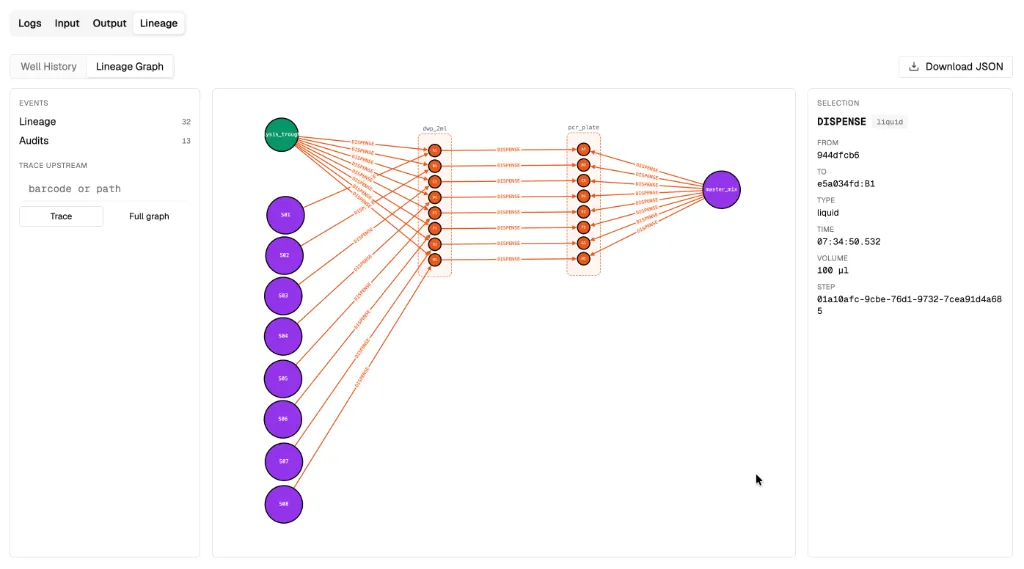
- Lineage Graph shows resources and the movement between them.
- Trace upstream narrows the graph to the sources that contributed to a selected resource.
The following example shows the lineage graph for a simple lysis and PCR setup for eight samples.
The well history view shows the events for a PCR plate well in the same setup.
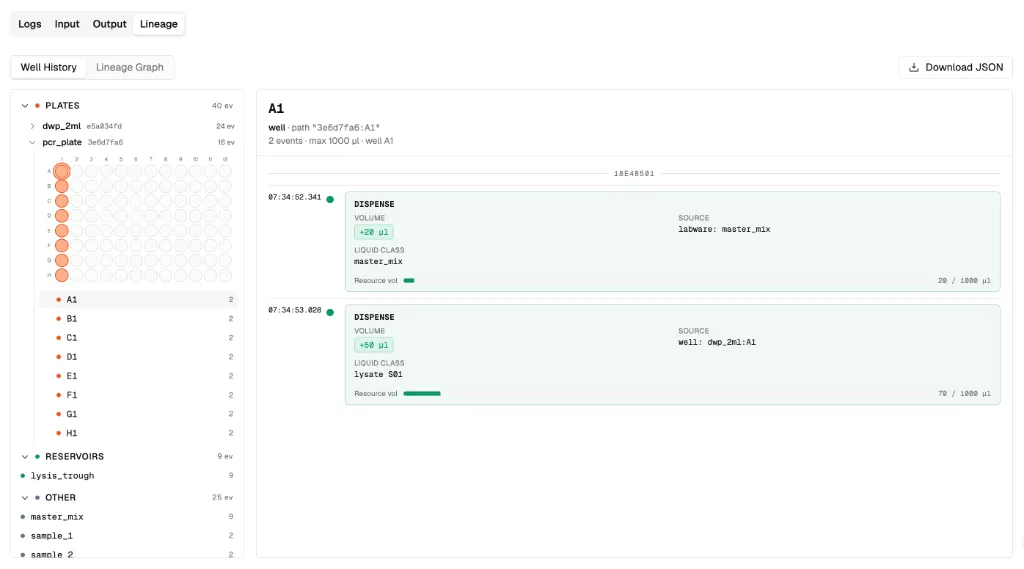
On an active run, new events show up as they reach the Platform, by default when each phase exits. You can also download the run's lineage as JSON.
The current viewer recognizes well plates, tip racks, carriers, reservoirs, and pipette channels.
audit events out of the lineage views and shows every other category as lineage, including custom ones like error. To tell successful and failed operations apart, check the event's type in the API response or the downloaded JSON.Next steps
- Emit lineage events from a Python workflow.
- Read lineage events through the API or live event stream.
- Read Labware to understand resource identifiers and parent-child relationships.
Last updated