

How it works
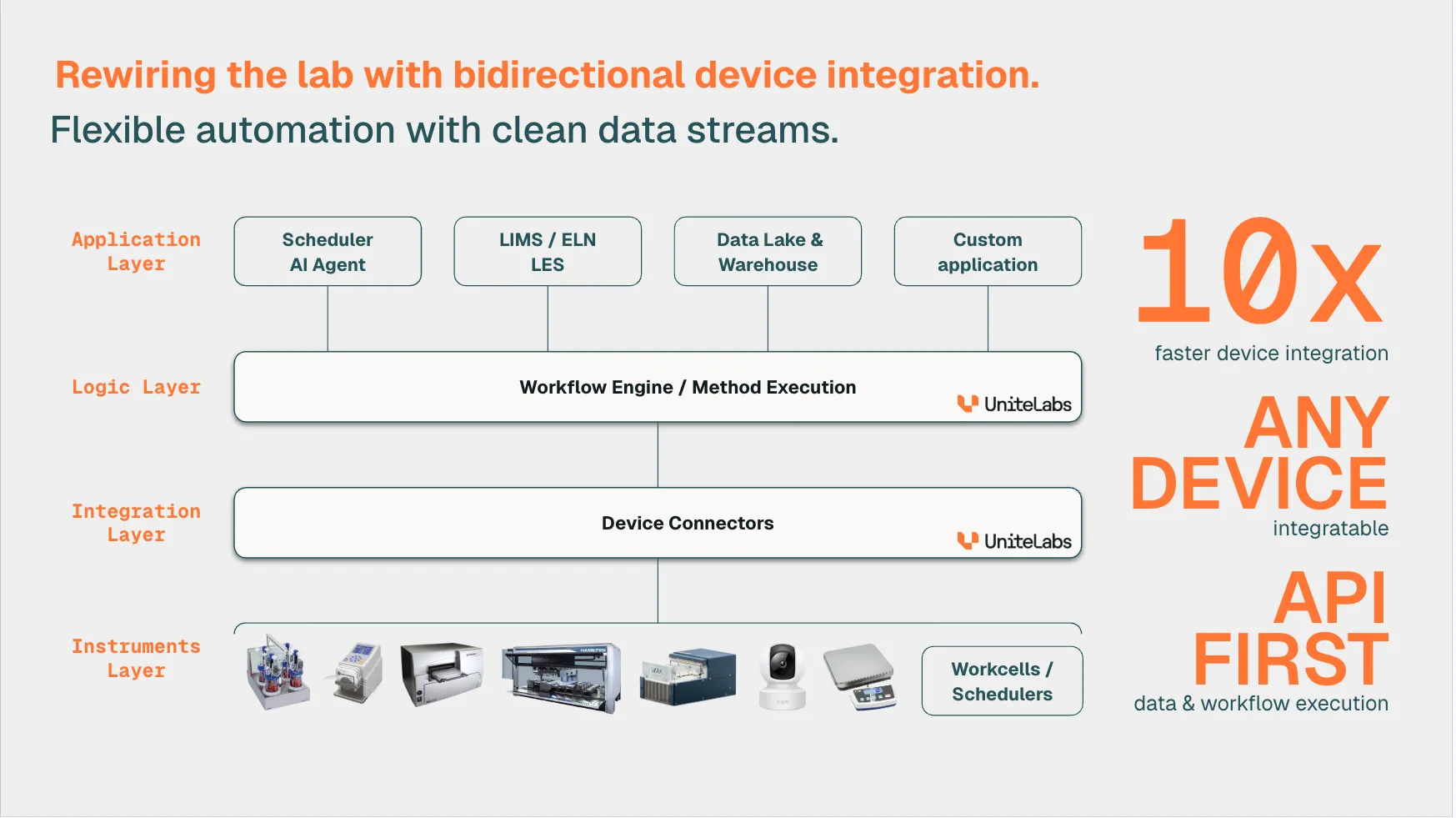
The UniteLabs Platform is built around a clean separation of concerns. Rather than point-to-point integrations, every instrument is connected once and then available to everything else through a unified API — no vendor-specific code needed downstream.
Connectors
Every instrument connects to the platform exactly once through a Connector — a driver running on the local machine paired with an edge gateway connecting to the cloud. Once connected, the instrument is available via the SDK, REST API, or Platform UI.
A Connector consists of a driver (running on a machine physically connected to the device) and an edge gateway (connecting to the cloud endpoint). A connector bundles these together into a standalone application that you can download and run with our edge application GroundControl. Connectors are available for multiple operating systems, including Windows, macOS, and Linux. The Connector Development Kit (CDK) lets you build a connector for any instrument in pure Python.
→ What is a connector? · Build a connector (CDK)
SDK
The SDK is a suite of currently three packages for controlling connected instruments from Python. We are expanding the list as we add abstraction layers for other types of instruments:
| Component | Package | Role |
|---|---|---|
| UniteLabs SDK | unitelabs-sdk | Platform connectivity — programmatic access to all API endpoints including devices, workflows, runs, databases, secrets and more. |
| Liquid Handling SDK | unitelabs-liquid-handling | Abstraction layer for liquid handling — unifies Hamilton, Bravo, and others behind one Python API. Uses the UniteLabs SDK under the hood and is enhanced by the labware library. |
| Labware Library | unitelabs-labware | Predefined labware geometries (plates, tips, carriers) and utilities for custom labware |
Install all three packages for liquid-handling workflows. For device control without liquid handling, install only unitelabs-sdk, following the installation guide.
→ SDK installation · Control with code
Orchestration
For multi-step, multi-instrument experiments, workcells and AI-driven automation, the Automate layer provides a structured workflow engine. Workflows are defined in Python as a hierarchy:
- Workflow: the top-level process, defined by the scientific result it produces.
- Phase: a group of steps that ends in a stable state a run can resume from.
- Step: a single action on one device. It completes or fails as a whole.
The engine tracks every execution as a run, and handles scheduling, operator pauses (human in the loop), and parallel phase execution automatically. Workflows are versioned in Git and testable against simulated devices in CI.
→ What is a workflow? · Your first workflow
Data Layer
Raw instrument output feeds into a layered data infrastructure — no manual storage management required. Our File System Connector makes it possible to store and acquire data in a variety of locations, including local storage, cloud storage, and more:
Instrument output → File System Connector → Object Storage (S3/MinIO)
                                                      ↓
                                           ETL Workflow (Workflow Engine)
                                                      ↓
                                        Data Warehouse (PostgreSQL)
Each layer is independently accessible: analysts can query the warehouse directly from any Postgres client; raw files remain in object storage for reprocessing at any time. Credentials are managed through the built-in Secrets system.